Otelyon Product Family · 03

Otelyon Staff

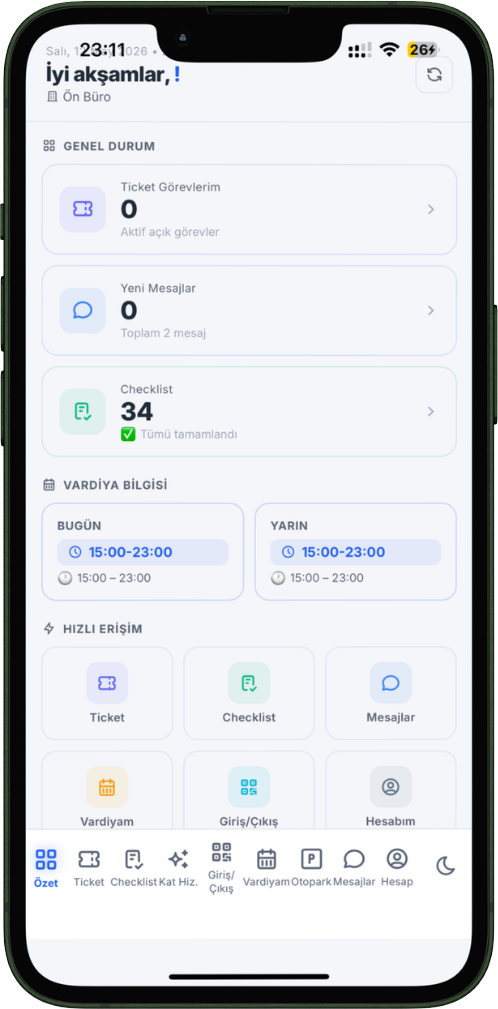
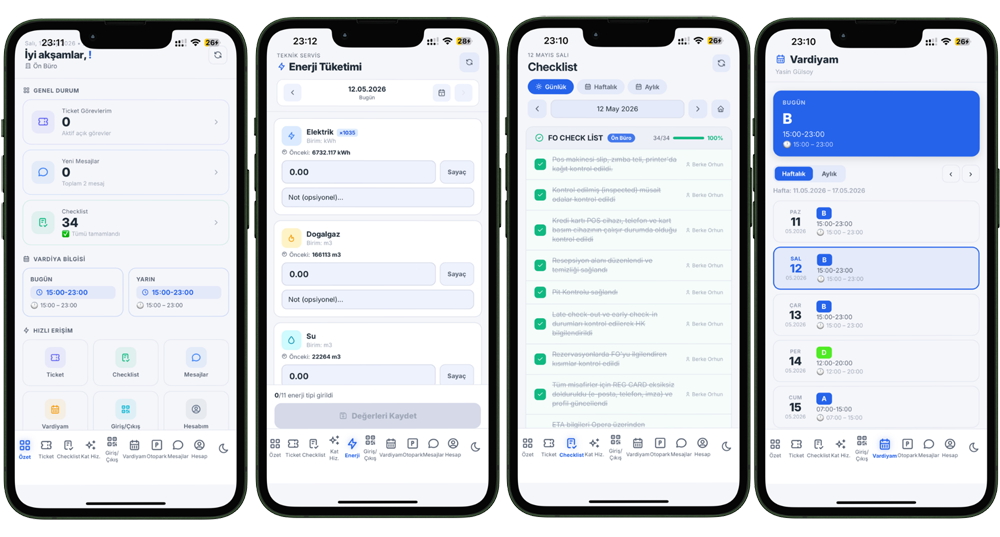
Workflow in your staff's pocket. No App Store, no link — add to home screen from the browser, use instantly. Tasks, messages, shift, housekeeping and valet screens all in one app. Instant notifications via Firebase push.

PWA
No Installation Required
12
App Screens
FCM
Push Notification
QR
Attendance System
Progressive Web App · Firebase FCM · Offline Support · Add to Home Screen · QR Reader · React 18 · Service Worker · Android & iOS ·

Workflow in Your Pocket

📲
No App Store Required
Staff performs a one-time "Add to Home Screen" from the browser. The app icon is added to the phone and a full-screen native app experience begins. Works on Android and iOS.
🔔
Instant Push Notification
New task, SLA warning and message notifications arrive instantly via Firebase FCM. Tapping the notification automatically opens the relevant screen.
📡
Offline Support
Thanks to Service Worker, the app stays open even when the connection is lost. When the connection returns, notifications and data are automatically synchronized.
🔐
Automatic Session
With the "Remember me" option, staff do not need to log in again at every shift. Session is protected with secure token rotation.

A Custom Screen for Every Role

Staff only see screens belonging to their own role. No unnecessary information, no unnecessary buttons.

My Tasks
5 open
Tasks (Tickets)
View assigned and department tickets in priority order. Update status, add notes, upload photos. SLA counter displayed live.
Messages
3 unread
Messages
User-to-user and department-wide messages. No need for WhatsApp groups. Instant notification via FCM push.
Meetings
This week
Meetings (Sales)
Customer meeting and appointment tracking screen for the sales team. Meeting outcome entry, activity log and calendar view.
Housekeeping
12 rooms
Housekeeping
Cleaner screen — assigned rooms, cleaning status and checklist. One-touch notification when a room is completed.
Valet / Parking
8 vehicles
Valet & Parking
Vehicle check-in/out, license plate and parking spot registration. Push notification when guest requests vehicle, SMS notification when vehicle is ready.
QR Attendance
Camera active
📷
QR Attendance
Attendance is recorded by scanning a fixed QR code at shift entry. Entry-exit times are automatically calculated and reflected in the HR module.
Profile & Settings
Active
Profile & Account
Profile photo, contact information, notification preferences and session management. "On duty" status is instantly reflected to the supervisor.
Notifications
FCM active
Push Notification Center
New task, SLA warning, message and approval notifications. Each notification deep-links to the relevant screen. Vibration and sound are customizable.
Leave Requests
Awaiting approval
Leave Management
Staff submit leave requests from the app. Approval or rejection notification arrives instantly via FCM push. Leave history and remaining balance are displayed.
Attendance / Timesheet
This month
Attendance & Timesheet
Monthly work schedule, entry-exit times and overtime summary. Staff view their own timesheet, track absences and approved leaves.

Ready in 30 Seconds

No App Store approval, no IT support, no update hassle. Staff open the link, add to home screen, and start using it.

🤖 Android Chrome / Edge
1
Open the link received from your manager with Chrome
2
Tap the "Install App" banner that appears at the bottom of the screen
3
Press the "Install" button — the icon is added to the home screen
4
Tap the icon, log in — allow push notifications
🍎 iPhone / iPad Safari
1
Open the link received from your manager with Safari
2
Tap the Share icon (square + arrow) in the bottom menu
3
Select "Add to Home Screen" and add it
4
Tap the icon, log in — full-screen app starts

Instantly Informed with Firebase FCM

Staff do not need to keep the app open. Notifications always reach via the service worker running in the background.

New Urgent Task
When an urgent priority ticket is opened, an instant notification is sent to all department staff. Tapping the notification opens the relevant ticket.
Task Assigned
When a supervisor assigns a task, the notification goes only to that staff member. No unnecessary noise.
SLA Warning
Responsible staff are warned before the task deadline. Supervisor and admin also learn about SLA breaches via separate notifications.
Completion Approval
When staff close a task, the supervisor receives an approval notification. The guest is also sent a service completed notification.
New Message
Instant push notification when a department announcement or personal message arrives. Deep-links to the Messages screen.
Valet Call
When a guest requests their vehicle, an instant notification is sent to the valet staff. When the vehicle is ready, the guest is notified via SMS.

Everyone Sees Only Their Own Screen

Same app, different roles. Screens, tabs and menus automatically take shape based on the logged-in user's role.

Superadmin
Admin
Supervisor
Staff
HR
Sales
SalesAdmin
Staff screens
Tasks (assigned + department) · Messages · Profile
Room list and checklist for housekeeping staff
Vehicle list and QR reader for valet staff
Supervisor screens
All department tickets · Task assignment · SLA monitoring
Staff list and workload distribution · Messages · Profile
Sales screens
Meeting calendar · New meeting record · Outcome entry
Own activity history · Messages · Profile

Everything in your staff's pocket.

No App Store, no installation. Add to home screen from the browser, use instantly. Try Otelyon Staff PWA today.