Otelyon Product Suite · 05

Otelyon HR & Overtime

QR attendance, leave request & approval workflow, timesheet, shift planning, and staff reporting — the entire hotel HR operation in one system. No more paper forms, manual calculations, or lost records.

6
HR Modules
QR
Attendance
Auto
Timesheet
Push
Notifications
Otelyon HR & Overtime
QR Attendance · Check-In & Out · Leave Request · Approval Workflow · Timesheet · Overtime Tracking · Shift Planning · Weekly & Monthly Schedule · Shift Swap · HR Calendar · Staff Report · Department-Based · Push Notifications ·

6 Modules, Full Coverage

From attendance to timesheets, from leave to shifts — every step of hotel HR operations in one system, all working together.

01
📲
QR Attendance

Staff scan the QR code at the start and end of their shift to log check-in/out. The system timestamps automatically — no manual intervention required.

  • QR display on dedicated terminal screen
  • Staff PWA scan support
  • Date & time-stamped records
  • Late arrival and early departure detection
  • Location data logging
02
🗓️
Leave Management

Staff submit leave requests through the system. A supervisor or admin approves or rejects them. Approved leaves are automatically reflected in the timesheet and calendar.

  • Annual, excused, and unpaid leave types
  • Multi-step approval workflow
  • Automatic total day calculation
  • Rejection note & push notification
  • Department-level leave view
03
📊
Timesheet

Monthly working hours, overtime, and leave days are automatically calculated from QR attendance data. Excel-like view for easy accounting export.

  • Monthly attendance analysis
  • Daily / total hours calculation
  • Automatic leave day processing
  • Department-based filtering
  • Period-over-period comparison
04
🕐
Shift Planning

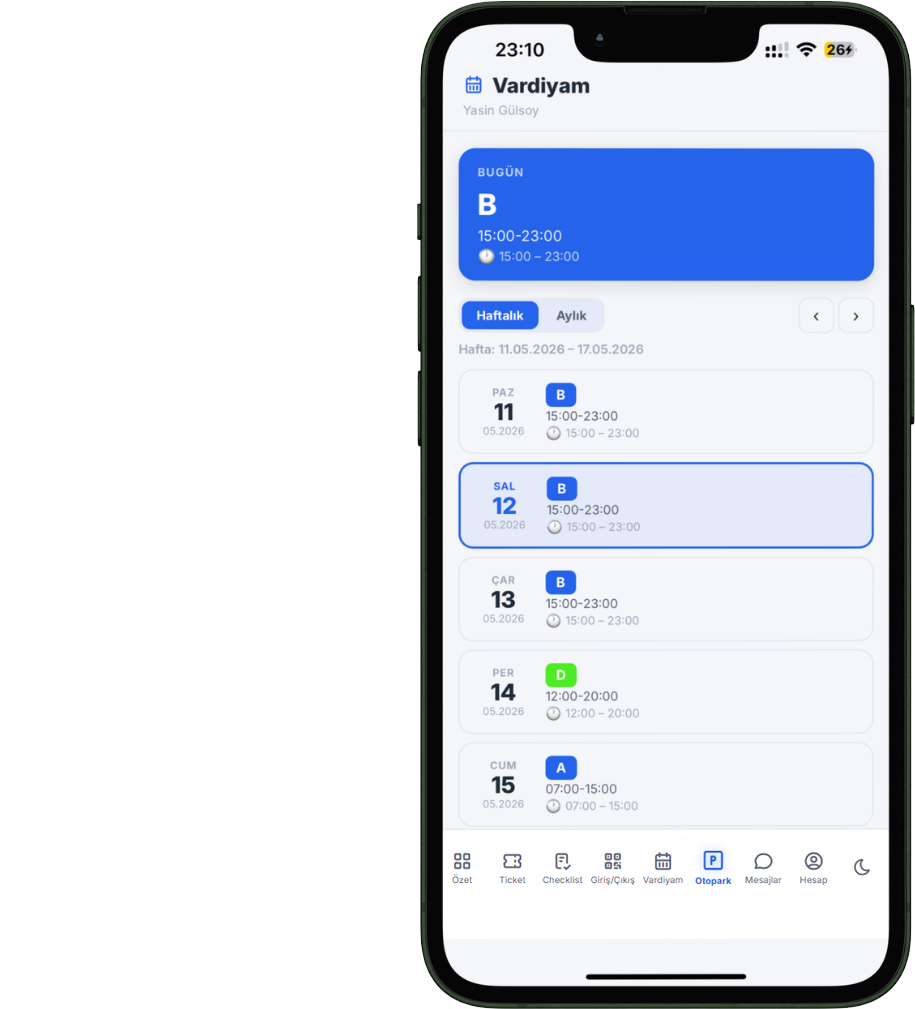
Create weekly and monthly shift schedules by department. Define shift types (A, B, Night, Off…) with color codes and assign them to staff.

  • Custom shift type definitions
  • Weekly & monthly schedule view
  • Overlap conflict detection
  • Break time & general notes field
  • Manager approval signature
05
🔄
Shift Swap

Staff can view their own shifts and request changes or day swaps. Transparent management with a supervisor approval workflow.

  • Personal shift calendar view
  • Shift change request creation
  • Day swap requests
  • Approval / rejection notification
  • Pending request counter
06
📅
HR Calendar

View all HR events in one calendar. Approved leaves, shifts, and important dates are tracked in a unified calendar view.

  • Month / week / day views
  • Leave and shift integration
  • Department-based filter
  • Bulk calendar export

Paperless Check-In & Out

Staff scan the QR code on the terminal screen with their phone to check in or out. Date-time stamps are applied automatically and the attendance list updates instantly.

● Live
Check-In / Check-Out
Scan the QR code with your phone
Fatma Çelik
Housekeeping
08:02
Mehmet Yılmaz
Technical Service
08:07
Ali Demir
F&B
08:14 +14m
Ayşe Kaya
Reception
08:01
🖥️
Dedicated Terminal Screen
The QR screen opens full-screen on a tablet or monitor in the lobby or staff room. The code refreshes periodically — the same code cannot be reused.
📱
Integrated with Staff PWA
Staff can also scan the QR code from the Otelyon Staff app on their own phone. No app download required — runs directly in the browser.
📍
Location Logging
Location data is attached to each attendance record. Remote scan attempts and location mismatches can be monitored by the manager.
⚠️
Late Arrival Detection
Check-ins after shift start time are automatically flagged as late and reflected in the timesheet report. Automatic calculation, zero disputes.

Request, Approve, Record

Staff submit leave requests through the system; managers approve or reject with one click. Approved leave automatically flows into the timesheet and calendar.

1
Staff Submits Request
The staff member selects a leave type, enters start and end dates, and an optional note, then submits the request. Total days are calculated automatically.
pending
2
Supervisor / Admin Reviews
The manager sees pending requests in the list, then approves or rejects with a rejection note. A push notification immediately alerts the relevant staff member.
under review
3
Approval Notification Sent
Staff receive a push notification with the approval or rejection decision. For approved leaves, dates are automatically synced with the timesheet and HR calendar.
approved / rejected
4
Automatically Entered in Timesheet
Leave days appear automatically in the monthly timesheet. No separate calculation needed for accounting export — the data is ready.
timesheet → record
Leave Types
Annual Leave
Accrued paid annual leave days
Excused Leave
Illness, family situations, and urgent needs
Unpaid Leave
Leave days requested without pay
Birth / Marriage Leave
Special leave entitlements under legal rights
Bereavement Leave
Leave for the loss of a first-degree relative
+ Custom leave types can be defined per hotel

Monthly Hours Calculated Automatically

The timesheet, fed by QR attendance records, automatically calculates each staff member's monthly working hours, overtime, and leave days.

Timesheet — May 2026
24
Staff
3
On Leave
186h
Avg Hours
8m
Avg Late
Staff
Mon
Tue
Wed
Thu
Fri
Sat
Sun
Total
Fatma Çelik
D
D
40h
Ali Demir
L
D
46h
Mehmet Yılmaz
A
A
D
D
30h
Ayşe Kaya
D
48h+
Present L Late A Annual leave D Day off
Fed by QR Attendance
The moment staff scan the QR code, the timesheet updates automatically. No manual totaling at the end of the week, no error-fixing at the end of the month.
📤
Accounting Export
Monthly working hours and overtime summaries are exported in a format compatible with accounting workflows. Ready data for payroll calculation.
🏢
Department-Level Analysis
Total working hours, average late arrival time, and leave day distribution for each department are displayed separately. Reliable data for management decisions.
📅
Period Comparison
Compare this month's average hours with last month's or the same period last year. Seasonal changes and standard hour compliance are visible at a glance.

Weekly & Monthly Shift Schedules

Define shift types by department, assign them to staff, and let staff see on their phone which shift they're working this week.

🎨
Custom Shift Types

Create custom shift types for each department — A, B, Night, Morning, Off, and more. Color code, time range, and order are freely configurable.

📋
Weekly & Monthly Schedule

Assign daily shifts to each staff member on a grid-based schedule screen. Schedules are created for weekly or monthly periods and can be copied.

Conflict Detection

When overlapping shifts are assigned to the same staff member, the system alerts you. Scheduling errors are caught before they happen.

📱
Staff View Their Own Shifts

Staff can view their current week and monthly shift schedule from the PWA app. No surprises — planning is transparent.

🔄
Swap & Exchange Requests

Staff can request shift changes or day swaps. Supervisors approve or reject. Decisions are delivered via push notification.

📝
Schedule Notes

Each schedule can include break information, general notes, and a manager signature. The official shift schedule is published with manager approval.

Everyone Within Their Own Permissions

Access to HR modules is separated by role. Staff only see their own data; managers monitor the entire department.

Admin / Superadmin
All HR modules — timesheets, leave approvals, shifts, reports, all departments
HR Role
Leave management, attendance list, timesheet, QR terminal screen
Supervisor
Leave requests for their department, shift schedule, shift swap approvals
Staff
Personal shift calendar, leave requests, own attendance history, swap requests

Data-Driven HR Decisions

From check-in/out times to per-staff overtime analysis, from leave usage to department productivity — all HR data is reportable.

🕐
Attendance Report

Daily check-in/out records, late arrival durations, missing attendance warnings, and department-level attendance status.

DailyWeeklyMonthly
📊
Overtime Analysis

Per-staff working hours, overtime calculation, and deviation analysis against standard hours. Ready summary for accounting.

MonthlyQuarterlyAnnual
🗓️
Leave Report

Department-level leave usage status, approved/rejected requests, and the periods with the highest leave volume.

MonthlyAnnual
👥
Staff Performance Report

Individual attendance score, average late arrival time, total working hours, and standard hour compliance. Core data for periodic staff evaluation.

MonthlyQuarterly

Put your HR operations on autopilot.

QR attendance, automatic timesheets, leave approval workflows, and shift planning — say goodbye to paper forms, manual calculations, and Excel spreadsheets.